Quick Start Guide
Required hardware
- PhotonDrive ESC-A-150
- A power distribution board compatible with the selected battery
- Flight controller
- BLDC motor
- Battery compatible with the ESC-A-150 (6S LiPo maximum)
- Power leads (8–12 AWG cable recommended)
- Signal wire
Use high-quality, silicone-insulated wire for every power connection. A fully charged 6S LiPo reaches 25.2 V, so every component in the power path must be rated accordingly.
Connections
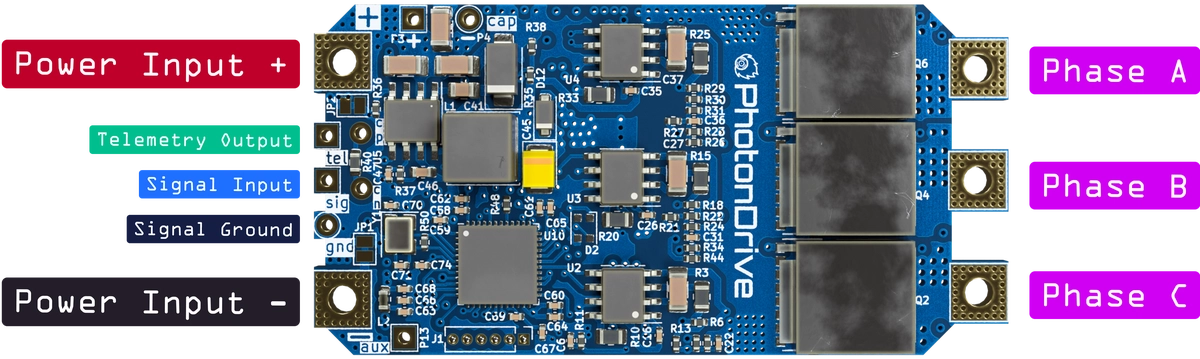
Confirm every connection against the pinout below. Use a power distribution board that supports the battery’s entire voltage range. The PDB 500 HotSwap supports 6S LiPo from 21.0 to 25.2 V for its main power path and 5 V / 12 V outputs. Its 15 V output is not supported on 6S. Do not increase the battery cell count to use that output: the ESC-A-150 is limited to 6S.
First power-up
Remove the propeller before applying power. Check polarity and measure for a short circuit between the power leads. For the first test, a protected 15 V source can be connected directly to the ESC. Do not route that supply through a PDB 500 HotSwap, because 15 V is below the PDB’s documented input range.
Connect the battery or test source through an appropriately rated fuse and power up the system. The ESC should initialize, and the motor should emit its startup tones.
Configuration
Each ESC can be configured through the flight controller, for example with Betaflight passthrough.
Configuration depends on the installed firmware. The archived PhotonDrive image is ESCape32 revision 10.8, so the current ESCape32 settings reference includes options that are not available on this legacy build.
Use the ESCape32 CLI show command to list the settings available in the
installed build. Some settings can also be changed through
DShot programming
while the ESC is connected to a compatible flight controller. For another
firmware, follow the instructions supplied by that project.
Flashing custom firmware
Firmware installation is intended for experienced users. An incorrect bootloader, target or connection can leave the ESC unresponsive and may damage the hardware.
The ESC-A-150 supports firmware installation over SWD. Follow the Flashing Guide, and use only a bootloader and firmware built for this legacy board.
Need help with your setup? Contact us.